AI Skills for HR Professionals: What to Learn and Practice Now
AI skills for HR professionals and recruiters: the five that matter, a free one-week practice plan, and the EU and New York rules on AI in hiring to know.

Vivek Gupta · IIT Delhi alumnus
· 10 min read

The AI skills for HR professionals that matter most are not technical. You need to give an AI tool clear context about a role or policy, check its output against the source, design a hiring step where a person makes every decision that affects a candidate, and know the basic rules on AI in employment where you hire. None of this requires code, and you can start practicing this week with a free tool.
Why now? Recruiting teams are already using these tools. LinkedIn's Future of Recruiting 2025 report, based on a September 2024 survey of 1,271 recruiting professionals in 23 countries, found that 37% of organizations were actively integrating or experimenting with generative AI in hiring, up from 27% a year earlier. Those teams reported saving about 20% of their work week, roughly one full workday. The rest of this guide covers what to learn, how to practice it and where to be careful.
Key takeaways
- Skills beat tools. Writing clear instructions, checking output and redesigning a workflow carry over to whatever HR software your employer uses next.
- AI drafts, people decide. Use AI to prepare job descriptions, questions and summaries. Keep shortlisting, rejections and offers with a person.
- Hiring is a regulated use of AI. The EU AI Act treats AI used for recruitment as high-risk, and New York City requires bias audits for certain hiring tools.
- Start small and measure. Pick one frequent task, time it before and after, and keep a short log of what worked.
How is AI changing HR and recruiting work?
The change is broad, but AI in recruitment is moving fastest. In SHRM's 2024 Talent Trends survey of 2,366 HR respondents at US organizations, about one in four employers used AI for HR activities. Among those adopters, 64% used it in talent acquisition, and generating job descriptions was the most common use (65% of them).
Looking further ahead, the World Economic Forum's Future of Jobs Report 2025, which surveyed over 1,000 employers representing more than 14 million workers in 55 economies, found that workers can expect 39% of their existing skill sets to be transformed or become outdated between 2025 and 2030. AI and big data top its list of fastest-growing skills. Two-thirds of employers plan to hire talent with specific AI skills, 85% plan to prioritize upskilling their workforce, and 40% expect to reduce their workforce where AI can automate tasks. That last number is a reason to plan, not to panic. The tasks most exposed are the repetitive ones, and the work that remains needs more judgment.
The same pattern shows up in other markets. In India, a Nasscom–Indeed study of the technology sector reported in January 2026 that about 85% of hiring managers saw a rise in skills-based hiring and about 40% of HR leaders flagged gaps in AI-related skills.
There is also a gap inside companies. Gartner reported in October 2025 that only 8% of HR leaders believe their managers have the skills to use AI effectively, and only 14% of organizations said they support managers in using generative AI in daily tasks. HR usually owns that training problem, which is one more reason to build the skill yourself first.
Which AI skills for HR professionals matter most?
Here are the five I would focus on, in order. Each one is about how you work, not which product you use.
| Skill | What it looks like in HR work | How you know you have it |
|---|---|---|
| Giving clear context | Writing a prompt that includes the role, level, team, must-have skills and your house style | The first draft needs light edits, not a rewrite |
| Checking output | Comparing every AI-drafted policy answer or summary against the source document | You catch a wrong fact before anyone else sees it |
| Structured evaluation | Turning a role into skills, then into interview questions and a scoring rubric | Two interviewers score the same answer in a similar way |
| Workflow redesign | Mapping a hiring or onboarding process and marking which steps AI prepares and which a person decides | You can draw the process on one page and point to the human checkpoints |
| Responsible use | Knowing what candidate data can go into which tool, and the rules that apply where you hire | You can explain how a tool was used in a hiring decision |
The third skill deserves extra attention. In LinkedIn's report, 93% of talent acquisition professionals said accurately assessing a candidate's skills is crucial for improving quality of hire. AI is good at turning a vague job brief into a list of skills, questions and a rubric. Your job is to make sure those skills are the ones the role actually needs.
If you want a broader view of what this kind of all-round AI ability looks like across roles, see what an AI generalist is.
Where should HR teams use AI, and where should they not?
A useful rule: let AI prepare the work, and keep a person on any decision that changes someone's job prospects or pay.
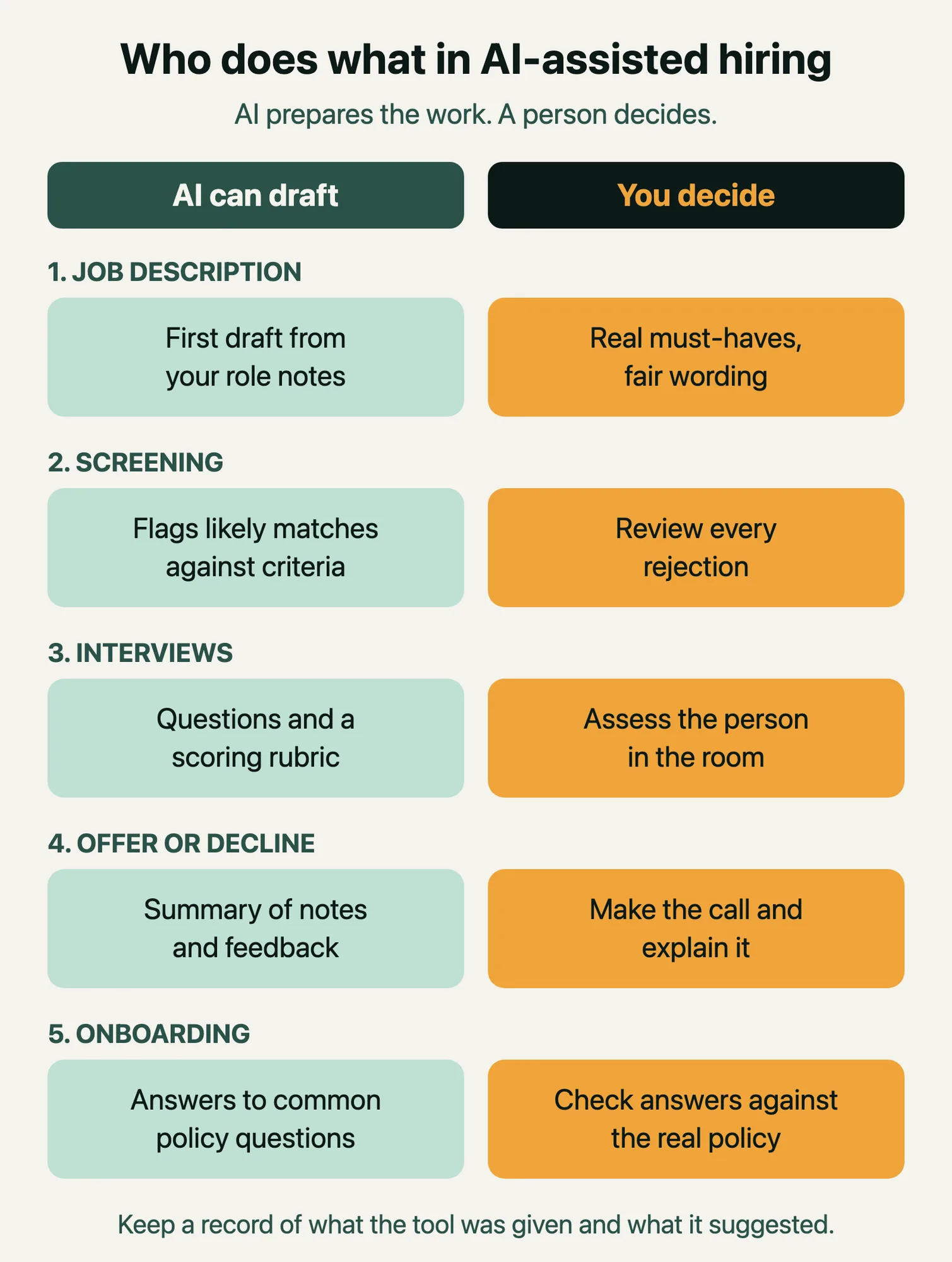
Good places to start:
- Job descriptions. Give the tool your role notes and ask for a draft. Then remove inflated requirements and check the wording for anything that could discourage qualified people from applying.
- Interview kits. Ask for behavioral and scenario questions tied to each required skill, plus a simple 1–4 scoring guide.
- Policy FAQs. Turn a long leave or expenses policy into plain-language questions and answers, then verify each answer line by line.
- Feedback themes. Summarize anonymized survey comments or exit-interview notes into themes, and spot-check the themes against the raw comments.
Places to be careful:
- Automatic rejection. Do not let any tool reject candidates without a person reviewing the decision.
- Personal data. Do not paste CVs, salaries or health information into a consumer AI tool unless your employer has approved that tool for that data.
- Unverified answers. A confident but wrong answer about notice periods or benefits can cause real harm to an employee.
Checking AI output takes time too, so plan for it. Our guide on cutting the hidden time cost of AI covers how to keep that review effort under control.
What do the laws say about AI in hiring?
This section is general information, not legal advice. Rules differ by country and change often, so check with your legal or compliance team before using AI in hiring decisions.
The EU AI Act treats recruitment AI as high-risk
The EU AI Act lists AI systems "intended to be used for the recruitment or selection of natural persons, in particular to place targeted job advertisements, to analyse and filter job applications, and to evaluate candidates" as high-risk in Annex III, point 4. The same point covers AI used for promotion, termination, task allocation and monitoring performance. The European Commission's AI Act overview gives "CV-sorting software for recruitment" as an example.
Timing matters here. According to the Commission, after the AI Omnibus changes, the high-risk rules for areas including employment will apply from 2 December 2027, instead of the original August 2026 date. AI literacy obligations already apply, from 2 February 2025. If your organization hires in the EU, now is a good time to list which hiring tools use AI and who checks their output.
New York City requires bias audits for hiring tools
New York City's Local Law 144 covers automated employment decision tools. According to the city's Department of Consumer and Worker Protection, an employer or employment agency may use such a tool only if it has had a bias audit within one year of use, a summary of the audit results is publicly available, and candidates or employees receive the required notices. The department's guidance says notice must be given 10 business days before the tool is used. Enforcement began on 5 July 2023.
A practical checklist for any country
- Inventory. List every hiring or HR tool that uses AI, including features switched on inside your existing software.
- Human review. Write down who reviews AI suggestions at each step, especially rejections.
- Records. Keep the instructions given to the tool, the criteria used and what the tool suggested.
- Transparency. Tell candidates and employees when AI is part of a process.
- Vendor questions. Ask suppliers whether their tool has been audited for bias, and ask to see the results.
How can you practice AI skills in HR this week for free?
You do not need a budget. A free tier of a general assistant such as ChatGPT, Gemini or Claude is enough for every exercise below. Use made-up or anonymized information only.
| Day | Exercise | What you are practicing |
|---|---|---|
| Day 1 | Draft a job description for a role you know well, then edit it into your company's voice | Giving clear context |
| Day 2 | Turn that job description into six required skills, two questions per skill and a 1–4 rubric | Structured evaluation |
| Day 3 | Convert a public policy document into a 10-question FAQ, and check each answer against the source | Checking output |
| Day 4 | Map your hiring process on one page and mark each step "AI prepares" or "person decides" | Workflow redesign |
| Day 5 | Write a one-paragraph note to candidates explaining how AI is used in your process | Responsible use |
At the end of the week, write down one task you would trust AI with again and one you would not. Then time that first task the next time you do it for real, before and after. This simple measurement is how small experiments turn into a case for changing how your team works. If you are planning this for a whole team, our roadmap for AI upskilling for employees shows how to roll it out by role.
How to go deeper
Practicing alone works, but it is slow to get honest feedback on whether your prompts, rubrics and workflows are good. If you want structure, the AI Generalist Certification is built for professionals in any role, with no coding needed. You join live online sessions from anywhere, get feedback on your own work, build a portfolio project around a real problem from your job, and earn a certificate anyone can verify. You can join the next cohort when it suits you.
Frequently asked questions
Will AI replace HR professionals?
AI is taking over parts of HR work, mainly drafting, scheduling and first-pass sorting. The parts that remain, such as judging people, handling sensitive conversations and making fair decisions, need more human attention, not less. The WEF expects many skills to change by 2030, so the safer path is to learn to direct the tools rather than wait.
Do HR professionals need to learn coding to use AI?
No. The core skills are writing clear instructions, checking output and redesigning workflows. Many HR teams also build simple automations with no-code tools, which you can learn later once the basics feel natural.
Is it legal to use AI to screen resumes?
It depends on where you hire. In the EU, AI used to filter job applications is classed as high-risk under the AI Act, with obligations applying from 2 December 2027. In New York City, automated hiring tools need a bias audit and candidate notices. Check local rules with your legal team before you use AI in any screening decision.
What is the best first AI task for a recruiter?
Drafting a job description and interview kit is a good first task. The risk is low because you edit everything before it is used, and the time saved is easy to measure. It also builds the skill of turning a role into clear, assessable skills.
How do I show employers I have AI skills in HR?
Show your work. Keep before-and-after examples of a job description, a rubric or a policy FAQ you improved with AI, along with notes on how you checked the output. A short write-up of one workflow you redesigned, with the time it saved, says more than a list of tools.
Found this useful?
Next cohort starts 1 Dec
AI Generalist Certification
Become the person on your team who gets things done with AI.
- Tuesdays, Thursdays and Saturdays, 7–9 PM IST
- 4 weeks · 12 sessions · 24 live hours · Online
- For: Professionals, managers, founders and career switchers
- ₹24,999 per seat, taxes extra
About the author
Vivek Gupta · IIT Delhi alumnus
Vivek Gupta is an IIT Delhi alumnus and PhD scholar, an AI researcher and serial entrepreneur with 14 years of building technology at MakeMyTrip, Goibibo, Wissen and Jubilant FoodWorks.
Discussion
No comments yet. Start the discussion.