Build a RAG App From Scratch: No API Key, No Cloud
Learn how to build a RAG app from scratch: a working Python semantic search tool using free, open-source embeddings, no API key or cloud account needed.

Vivek Gupta · IIT Delhi alumnus
· 14 min read
If you want to learn how to build a RAG app from scratch, the good news is that the hardest and most useful part, retrieval, needs no paid API, no cloud account and no sign-up. In the next hour you will write and run a small Python tool that turns a folder of notes into searchable meaning, using a free, open-source embedding model running entirely on your own laptop.
RAG stands for retrieval-augmented generation: instead of asking a language model to answer purely from what it memorized during training, you first retrieve the most relevant pieces of your own text, then hand those pieces to the model as context. This guide builds and tests the retrieval half end to end, in real code, with real output at every step, so you understand exactly what is happening before you ever add a paid model on top.
Key takeaways
- RAG has two halves: retrieval (finding the right text) and generation (writing an answer from it). This tutorial builds retrieval, the part you can do for free.
- Embeddings turn text into numbers. A sentence becomes a vector of 384 numbers; similar meanings end up as similar vectors, even with no shared words.
- Cosine similarity finds the closest match. It scores how aligned two vectors are, from -1 to 1, and is the standard way to rank search results.
- Everything here runs locally, using the open-source
sentence-transformerslibrary and a small model calledall-MiniLM-L6-v2, so there is nothing to sign up for and nothing to pay for. - Embeddings have real limits, including a token cutoff and no built-in sense of "I don't know" — you will see both fail in this tutorial, not just read about them.
What is RAG, in plain terms?
Large language models are trained once on a huge snapshot of text, then frozen. They are excellent at language but cannot read your personal notes, your company's documents, or anything published after their training cutoff. Retrieval-augmented generation closes that gap: a 2020 paper by Patrick Lewis and co-authors at Facebook AI Research, Retrieval-Augmented Generation for Knowledge-Intensive NLP Tasks, paired a pretrained generator with a retriever that searches a dense vector index, and showed this combination answered open-domain questions more accurately than a generator working from memory alone. That paper used Wikipedia as the knowledge source; in this tutorial, the knowledge source is a plain text file you write yourself.
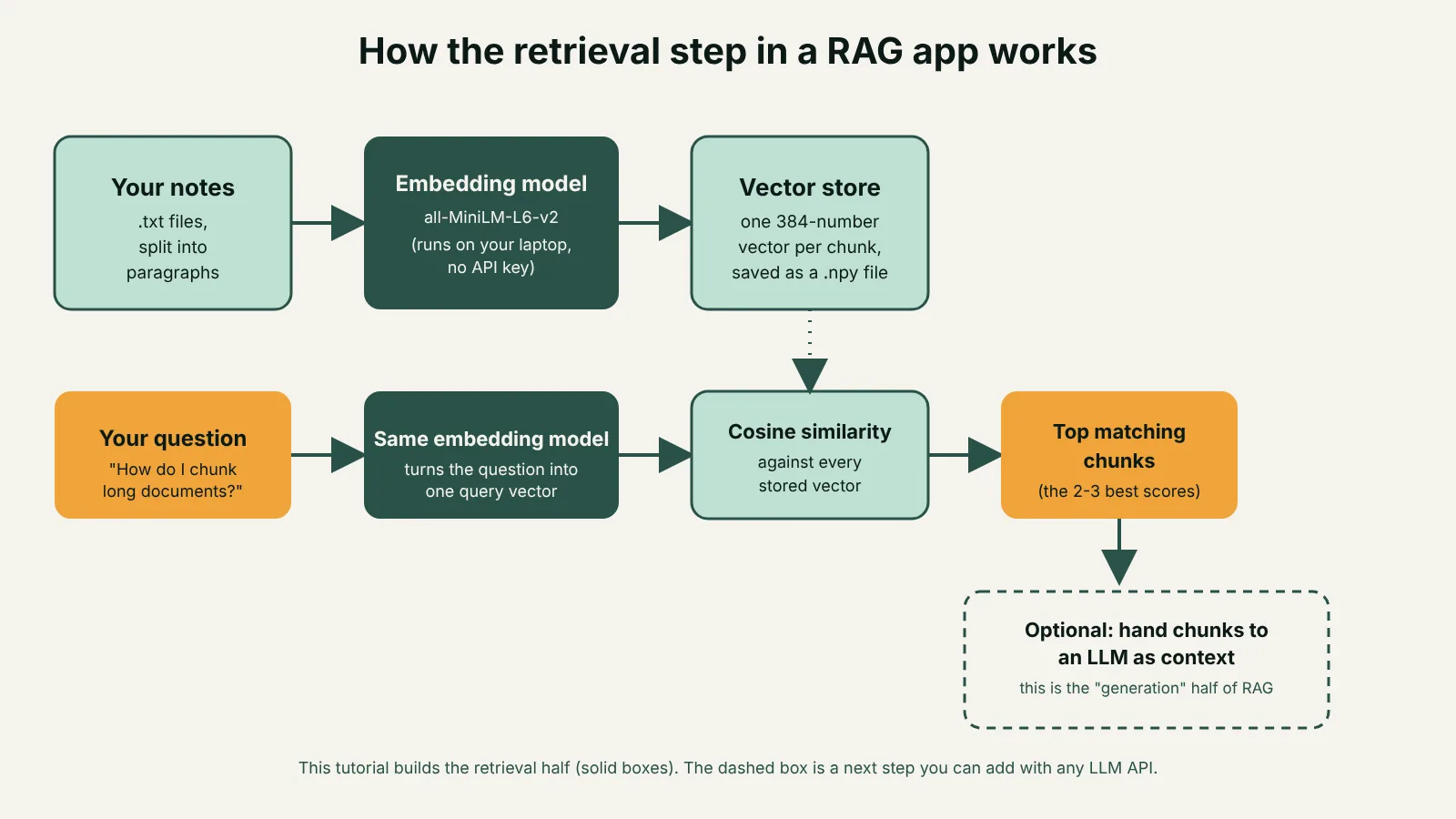
The practical shape of RAG is always the same: split your documents into chunks, turn each chunk into an embedding vector, store those vectors, then at question time embed the question and find the closest-matching chunks. What you do after that, generation, is a separate step that needs a language model. We will build everything up to that point.
What you will build: a RAG app from scratch
By the end of this tutorial you will have three small Python scripts and a folder of notes:
build_index.py— reads your notes, splits them into chunks, embeds each chunk, and saves the vectors.search.py— embeds a question and returns the closest-matching chunks, ranked by score.build_prompt.py— assembles a ready-to-send prompt from your question and the retrieved chunks, the last step before handing it to a language model.
Everything below was actually run during the writing of this article, on Python 3.11, with sentence-transformers 6.3.0, PyTorch 2.15 (CPU build) and NumPy 2.4.6. Exact version numbers aside, the code works the same on any reasonably recent Python 3 install.
What you need
- A computer with Python 3.9 or newer installed.
- About 500 MB of free disk space (for the libraries and the small model, which downloads once).
- No API key, no credit card, and no account with any AI provider.
Step 1: Set up your environment
Create a project folder, a virtual environment, and install three libraries: PyTorch (the CPU-only build, which is much smaller than the GPU build), sentence-transformers, and NumPy.
mkdir rag-from-scratch && cd rag-from-scratch
python3 -m venv venv
source venv/bin/activate
pip install torch --index-url https://download.pytorch.org/whl/cpu
pip install sentence-transformers numpy
This pulls in sentence-transformers, the open-source library that wraps embedding models behind a simple encode() call, maintained alongside the models on the official project site. The first time you use a model it downloads automatically from Hugging Face and is cached locally, so later runs are instant and fully offline.
Step 2: Write a few notes to search over
Create a notes folder and add a plain text file with a handful of short paragraphs, one idea per paragraph, separated by a blank line. Real notes work the same way; here are eight short ones about AI concepts, which we will also use to test the search tool later:
notes/ai-notes.txt

Embeddings turn text into a list of numbers (a vector) that captures meaning, not just words. Two sentences with similar meaning end up close together in this vector space, even if they do not share a single word.

Chunking means splitting long documents into smaller pieces before embedding them, usually a few hundred words each, sometimes with overlap between chunks, so that each chunk is small enough to embed well and specific enough to be useful on its own.

An AI agent is a system that can decide which tool to call, call it, look at the result, and decide what to do next, instead of just producing one block of text. A simple chatbot answers in one shot; an agent can take several steps toward a goal.
(The full file used in this tutorial has eight paragraphs; three are shown here to keep the example short. The idea scales to hundreds of pages — only the embedding time grows.)
Step 3: Turn your notes into embeddings
This is the core of retrieval: load the text, split it into chunks, and embed every chunk with the model.
# build_index.py
import pathlib
import numpy as np
from sentence_transformers import SentenceTransformer

NOTES_DIR = pathlib.Path("notes")

def load_chunks():
    chunks = []
    for path in sorted(NOTES_DIR.glob("*.txt")):
        text = path.read_text(encoding="utf-8")
        paragraphs = [p.strip() for p in text.split("\n\n") if p.strip()]
        for paragraph in paragraphs:
            chunks.append({"source": path.name, "text": paragraph})
    return chunks

def main():
    chunks = load_chunks()
    print(f"Loaded {len(chunks)} chunks from {NOTES_DIR}")

    model = SentenceTransformer("all-MiniLM-L6-v2")
    texts = [c["text"] for c in chunks]
    embeddings = model.encode(texts, normalize_embeddings=True)

    np.save("embeddings.npy", embeddings)
    import json
    with open("chunks.json", "w", encoding="utf-8") as f:
        json.dump(chunks, f, ensure_ascii=False, indent=2)

    print(f"Saved {embeddings.shape[0]} embeddings of dimension {embeddings.shape[1]}")

if __name__ == "__main__":
    main()
Running python build_index.py on the eight-paragraph notes file above prints:
Loaded 8 chunks from notes
Saved 8 embeddings of dimension 384
Each paragraph is now a vector of 384 numbers, saved to embeddings.npy, with the matching text saved to chunks.json. The model, all-MiniLM-L6-v2, is documented on its official Hugging Face model card: it has about 22.7 million parameters, was fine-tuned on over a billion sentence pairs, and is released under the Apache 2.0 license, which is why it can run anywhere for free. The normalize_embeddings=True option scales every vector to length 1, which matters for the next step.
Step 4: Search your notes with a real question
Now embed a question the same way, and compare it against every stored vector using cosine similarity, which measures the angle between two vectors rather than their length. Because every vector was normalized to length 1 in the step above, the dot product of two vectors is already the cosine similarity — no extra division needed.
# search.py
import json
import sys
import numpy as np
from sentence_transformers import SentenceTransformer

def main():
    query = " ".join(sys.argv[1:]) or "What is chunking?"

    embeddings = np.load("embeddings.npy")
    with open("chunks.json", "r", encoding="utf-8") as f:
        chunks = json.load(f)

    model = SentenceTransformer("all-MiniLM-L6-v2")
    query_vector = model.encode([query], normalize_embeddings=True)[0]

    scores = embeddings @ query_vector
    top_indices = np.argsort(-scores)[:3]

    print(f"Query: {query}\n")
    for rank, i in enumerate(top_indices, start=1):
        print(f"#{rank} (score {scores[i]:.3f}) from {chunks[i]['source']}:")
        print(chunks[i]["text"])
        print()

if __name__ == "__main__":
    main()
Running python search.py "How do I split long documents before embedding them?" returns this, with no word in the question matching the stored text word-for-word:
Query: How do I split long documents before embedding them?

#1 (score 0.626) from ai-notes.txt:
Chunking means splitting long documents into smaller pieces before embedding them, usually a few hundred words each, sometimes with overlap between chunks, so that each chunk is small enough to embed well and specific enough to be useful on its own.

#2 (score 0.363) from ai-notes.txt:
Tokenization is the step where text is cut into small pieces called tokens, which can be whole words, parts of words, or punctuation. A model's context window is measured in tokens, not words or characters, which is why long documents sometimes need to be chunked before they fit.
This is the entire point of embeddings over plain keyword search: "split" never appears in the best-matching paragraph, yet it scored far above every other chunk, because the model represents meaning, not spelling.
Step 5: See where it breaks
A responsible tutorial shows failure, not just success. Run the same script with a question the notes know nothing about:
$ python search.py "What is the capital of France?"
Query: What is the capital of France?

#1 (score 0.043) from ai-notes.txt:
Cosine similarity measures how similar two vectors are by looking at the angle between them, ignoring their length. A cosine similarity close to 1 means the vectors point in almost the same direction, which usually means the two pieces of text are about the same thing.

#2 (score 0.037) from ai-notes.txt:
Tokenization is the step where text is cut into small pieces called tokens, which can be whole words, parts of words, or punctuation. A model's context window is measured in tokens, not words or characters, which is why long documents sometimes need to be chunked before they fit.

#3 (score 0.036) from ai-notes.txt:
A vector database (or vector store) stores these embeddings alongside the original text, and can quickly find the vectors closest to a new query vector. For small projects, a plain Python list and NumPy are enough; you do not need a dedicated database until you have many thousands of documents.
Notice the scores: 0.043, compared to 0.626 for a genuinely relevant question. The search still returns three results, because argsort always returns something — nothing in the code checks whether a match is actually good. In a real application you would discard results below a similarity threshold (often somewhere around 0.2 to 0.3, tuned on your own data) and have the system say "I don't know" instead of forcing an answer. This is also why RAG reduces hallucination but does not eliminate it: a weak match handed to a language model as if it were a strong one can still produce a confident, wrong answer.
A second limit is length. The official model card for all-MiniLM-L6-v2 states that by default it truncates any input longer than 256 word pieces; text beyond that is simply ignored. This is exactly why chunking matters: a 20-page document embedded as one chunk would have its ending silently dropped, while the same document split into paragraph-sized chunks is embedded in full.
Step 6: From retrieval to a full RAG answer
Everything so far finds the right text. Turning that into a written answer is the "generation" half of RAG, and it needs a language model, typically reached through a paid API, though some teams run open models locally instead. The retrieval code you already built does not change; you simply format its output as context for the next step:
# build_prompt.py (continues from search.py)
def build_prompt(query, passages):
    context = "\n\n".join(f"- {p}" for p in passages)
    return (
        "Answer the question using only the context below. "
        "If the context does not contain the answer, say you don't know.\n\n"
        f"Context:\n{context}\n\n"
        f"Question: {query}\n"
        "Answer:"
    )
Running this with the question "What is an AI agent and how is it different from a chatbot?" produces a complete, ready-to-send prompt with the three best-matching passages inserted as context, ending in Question: ... \nAnswer:. Hand that string to any language model's chat API and it answers grounded in your notes instead of its own memory. That last call is the one step in a full RAG app this tutorial deliberately does not run, since it is the one piece that genuinely requires a paid account; everything that gets you to a well-formed, well-grounded prompt is free.
The building blocks, at a glance
| Piece | What it does | What we used | Swap it for, as you scale |
|---|---|---|---|
| Documents | Raw text to search over | A .txt file of notes |
PDFs, web pages, a database export |
| Chunking | Splits text into search-sized pieces | Paragraphs, split on blank lines | A library with overlap and token-aware splitting |
| Embedding model | Turns text into a meaning vector | all-MiniLM-L6-v2 (384 dimensions, local) |
A larger local model, or a hosted embeddings API |
| Vector store | Holds vectors and finds the closest ones | A NumPy array and a dot product | A dedicated vector database once you pass tens of thousands of chunks |
| Generation | Writes an answer from the retrieved text | Not run in this tutorial | Any LLM chat API, given the assembled prompt |
Before you wire up generation, check:
- Low scores get rejected. Does your search return a low score for a question outside your documents, and do you have a threshold that catches it?
- Chunks fit the model. Are your chunks short enough that none of them hit the model's input-length cutoff?
- More than one test. Have you tried at least five real questions, not just the one that worked on the first try?
- Storage is accounted for. Do you know where your vectors and raw text are stored, and who else can read that file?
This last point matters more than it looks. Because the whole pipeline runs on your machine, your notes never leave it during retrieval — a genuine advantage over sending every search query to a third-party API, and one reason some teams keep retrieval local even when generation goes through a hosted model.
How to go deeper
Retrieval is the piece most tutorials gloss over, because the three scripts above are genuinely most of the hard-won engineering in a production RAG system: chunk size, the choice of embedding model, and when to trust a match are judgment calls you refine by testing against real questions, not settings you get right the first time. The patterns here, embedding, storing, scoring and now the first step of agent-style tool use, also show up directly in how AI agents decide which tool to call and what to do with the result; a retrieval function like search.py is exactly the kind of tool a simple agent calls before answering.
If you want to go from this working prototype to something you would actually run in production, that is what the AI Automation & Agents Bootcamp is built for. It is a 6-week, live online cohort with 36 hands-on hours, and one of its sessions is specifically about retrieval over your own knowledge: chunking, embeddings, hybrid search, citations and keeping an index fresh, building on exactly what you just wrote by hand. You get feedback on your own build from faculty, work toward three production-grade agents and a reviewed capstone, and leave with a verifiable certificate. Details and the next cohort's dates are at the program page.
Before you add more moving parts, it is also worth reading about when one well-built agent beats a team of specialist agents; the same discipline applies to retrieval: a single well-tuned search function usually beats a complicated multi-step pipeline. And if you are mapping out which skills to build next around this one, what an AI generalist actually knows how to do is a reasonable checklist to work through.
Frequently asked questions
Do I need an API key to build a RAG app?
No, not for the retrieval half. Embedding and searching your own text can run entirely with free, open-source models like all-MiniLM-L6-v2 on your own machine. You only need a paid API, or a locally hosted language model, for the final generation step, where a model writes an answer from the retrieved text.
What is the difference between RAG and fine-tuning?
Fine-tuning changes a model's internal weights using new training examples, which is slower and more expensive, and the model's knowledge still goes stale the moment training ends. RAG instead retrieves fresh, relevant text at the moment of the question and feeds it to the model as context, so the knowledge source can be updated just by changing your documents.
How big can my document collection be before I need a real vector database?
A NumPy array like the one in this tutorial comfortably handles tens of thousands of chunks on an ordinary laptop, since comparing one query vector against that many stored vectors is still a fast operation. Past that scale, or if you need the index updated continuously by multiple processes, a dedicated vector database adds indexing structures that make search faster and persistence more reliable.
Why did my search return irrelevant results?
Embedding search always returns the closest matches it has, even if none of them are actually relevant, because nothing in a basic cosine-similarity search enforces a quality bar. Check the similarity scores, not just the top result: a genuine match in this tutorial scored 0.626, while an unrelated question scored under 0.05. Set a minimum-score cutoff below which your app says it does not know, rather than guessing.
Which embedding model should I use instead of all-MiniLM-L6-v2?
all-MiniLM-L6-v2 is a good starting point because it is small, fast on CPU and free, but it is not the most accurate option available. As your project grows, compare it against other open models or a hosted embeddings API on your own real questions, since accuracy varies by language and domain, and the only reliable way to choose is to test on text like yours.
Found this useful?
Next cohort starts 2 Dec
AI Automation & Agents Bootcamp
Design, build and run AI agents and automations in production.
- Mondays and Wednesdays, 7–10 PM IST
- 6 weeks · 12 sessions · 36 live hours · Online
- For: Operations, product and technical teams, developers and analysts
- ₹44,999 per seat, taxes extra
About the author
Vivek Gupta · IIT Delhi alumnus
Vivek Gupta is an IIT Delhi alumnus and PhD scholar, an AI researcher and serial entrepreneur with 14 years of building technology at MakeMyTrip, Goibibo, Wissen and Jubilant FoodWorks.
Discussion
No comments yet. Start the discussion.